






General examples#
TensorWaves is a package for fitting general mathematical expressions to data distributions. It has three main ingredients:
Express mathematical expressions in terms of different computational backends.
Generate and/or transform data distributions with those mathematical expressions.
Optimize parameters in a model with regard to a data distribution.
Overview#
Optimize parameters#
The most important feature of TensorWaves are the optimizer and estimator modules. These can be used to optimize the parameters in a ParametrizedFunction to a data distribution. Here is a one-dimensional example for a normal distribution!
import numpy as np

rng = np.random.default_rng(seed=0)
data = {
    "x": rng.normal(loc=25, scale=5, size=1_000),
}
The normal distribution can probably be described with a Gaussian function:
import sympy as sp

x, n, mu, sigma = sp.symbols("x n mu sigma")
expression = n * sp.exp(-((x - mu) ** 2) / (2 * sigma**2))
expression
TensorWaves can express this mathematical expression as a computation function in different kinds of backends, so that we can perform fast computations on large data samples. Here, we identify some of the Symbols in the expression as parameters and create a ParametrizedFunction, so that we can ‘fit’ the function to the generated distribution.
from tensorwaves.function.sympy import create_parametrized_function

function = create_parametrized_function(
    expression,
    parameters={n: 30, mu: 15, sigma: 11},
    backend="jax",
)
initial_parameters = function.parameters
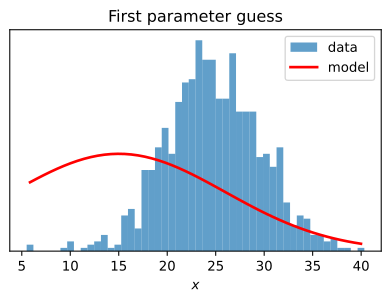
Next, we construct an Estimator and an Optimizer. These are used to optimize() the ParametrizedFunction to the data distribution.
Tip
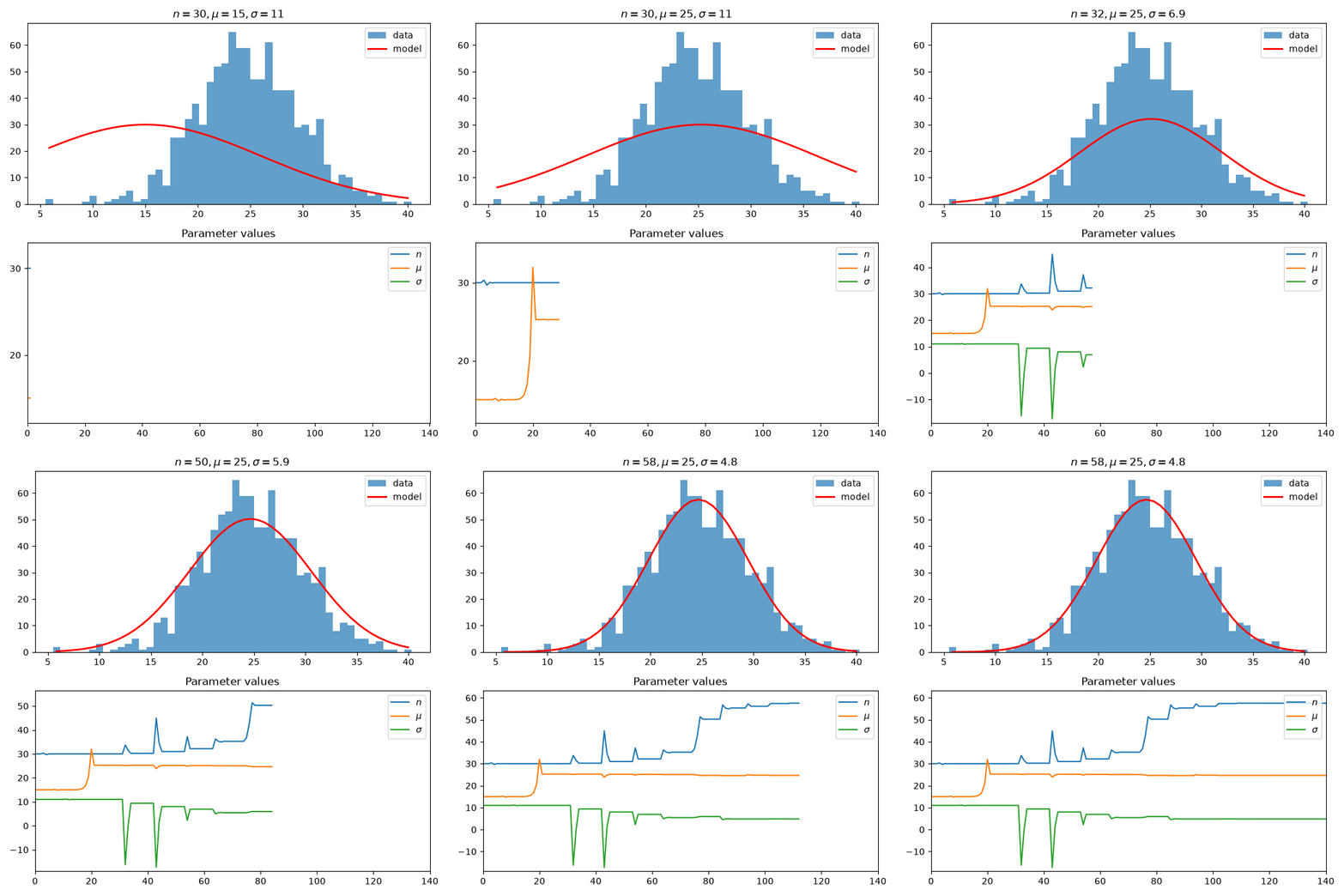
callbacks allow inserting custom behavior into the Optimizer. Here, we create a custom callback to create an animation of the fit!
from tensorwaves.estimator import ChiSquared
from tensorwaves.optimizer import Minuit2

estimator = ChiSquared(
    function,
    domain={"x": x_values},
    observed_values=y_values,
    backend="jax",
)
optimizer = Minuit2(
    callback=FitAnimation(data, function, x_values, "fit-animation.gif")
)
fit_result = optimizer.optimize(estimator, initial_parameters)
fit_result
FitResult(
 minimum_valid=True,
 execution_time=24.71979784965515,
 function_calls=138,
 estimator_value=893.0064312499305,
 parameter_values={
  'n': 57.5472444891085,
  'mu': 24.66244881440822,
  'sigma': 4.824113861014073,
 },
 parameter_errors={
  'n': 0.24667422660465863,
  'mu': 0.023967859355642697,
  'sigma': 0.023777409649100446,
 },
)
Tip
This example uses ChiSquared as estimator, because this works nicely with binned data (see also Binned fit and Chi-squared estimator). For other estimator examples, see Unbinned fit, Core ideas illustrated, and Amplitude analysis.
Computational backends#
TensorWaves uses sympy’s Printing mechanisms to formulate symbolic expressions as a function in a computational backend like NumPy, JAX, and TensorFlow.
import sympy as sp

x, y, a, b = sp.symbols("x y a b")
expression = x**3 + sp.sin(y / 5) ** 2
expression
from tensorwaves.function.sympy import create_function

numpy_function = create_function(expression, backend="numpy")
tf_function = create_function(expression, backend="tensorflow")
jax_function = create_function(expression, backend="jax", use_cse=False)
def _lambdifygenerated(x, y):
    return x**3 + sin((1/5)*y)**2
These functions can be used to perform fast computations on large data samples:
import numpy as np

sample_size = 1_000_000
rng = np.random.default_rng(0)
data = {
    "x": rng.uniform(-50, +50, sample_size),
    "y": rng.uniform(0.1, 2.0, sample_size),
}
%timeit -n3 numpy_function(data)

%timeit -n3 tf_function(data)
%timeit -n3 jax_function(data)
25.3 ms ± 152 μs per loop (mean ± std. dev. of 7 runs, 3 loops each)
64.5 ms ± 293 μs per loop (mean ± std. dev. of 7 runs, 3 loops each)
The slowest run took 202.19 times longer than the fastest. This could mean that an intermediate result is being cached.
2.08 ms ± 3.54 ms per loop (mean ± std. dev. of 7 runs, 3 loops each)
As we saw above, such a computational function can be used to optimize parameters in a model. It can also be used to generate data or to create an interactive visualization of an expression!
Generate and transform data#
The data module comes with tools to generate hit-and-miss data samples for a given expression. In addition, instance of the DataTransformer interface allow transforming DataSamples to a different coordinate system. An example would be to describe a distribution in polar coordinates \((r, \phi)\):
import sympy as sp

r, phi, dphi, k_phi, k_r, sigma = sp.symbols(R"r phi \Delta\phi k_phi k_r sigma")
expression = (
    sp.exp(-r / sigma) * sp.sin(k_r * r) ** 2 * sp.cos(k_phi * (phi + dphi)) ** 2
)
expression
polar_function = create_parametrized_function(
    expression,
    parameters={dphi: 0, k_r: 0.6, k_phi: 2, sigma: 2.5},
    backend="jax",
)
While the expression is described in polar coordinates, the input data arrays could be measured in a cartesian coordinate system. The data arrays can be converted efficiently with a SympyDataTransformer:
cartesian_to_polar = {
    r: sp.sqrt(x**2 + y**2),
    phi: sp.Piecewise((0, sp.Eq(x, 0)), (sp.atan(y / x), True)),
}
from tensorwaves.data import SympyDataTransformer

converter = SympyDataTransformer.from_sympy(cartesian_to_polar, backend="numpy")
We can now generate a domain sample for the function as well as an intensity distribution based on that expression using the tensorwaves.data module. Again, we first express the mathematical expression a computational function.
We then define a domain generator and a hit-and-miss IntensityDistributionGenerator with which we can generate a data distribution in cartesian coordinates for this expression in polar coordinates.
from tensorwaves.data import (
    IntensityDistributionGenerator,
    NumpyDomainGenerator,
    NumpyUniformRNG,
)

rng = NumpyUniformRNG()
domain_generator = NumpyDomainGenerator(boundaries={"x": (-5, 5), "y": (-5, +5)})
data_generator = IntensityDistributionGenerator(
    domain_generator, polar_function, converter
)
cartesian_data = data_generator.generate(1_000_000, rng)
polar_data = converter(cartesian_data)
See also
We can also use the SympyDataTransformer to interactively visualize how this ParametrizedFunction behaves for different parameter values!
Advanced examples#
The following pages show some more specific use cases of tensorwaves. See Amplitude analysis for how to use tensorwaves for Partial Wave Analysis.