






Constant sub-expressions#
As mentioned in 3.1 Prepare parametrized function, once we know which parameters in a ParametrizedFunction we want to optimize, we can apply several optimizations before running optimize(). The most important of these is to identify sub-expressions that are unaffected by a change to one of the parameters (constant sub-expressions). It’s smart to compute these sub-expressions beforehand (caching), so that only the top-expression has to be recomputed for each iteration of the Optimizer.
If we are creating the ParametrizedFunction from a sympy.Expr, the strategy is as follows:
Create a top-expression where the constant sub-expressions are collapsed into constant nodes (represented by
Symbols) and a mapping of thoseSymbols to the substituted sub-expressions. This can be done withextract_constant_sub_expressions().Create a new
ParametrizedFunctionfor this top-expression and aSympyDataTransformerfor the sub-expressions.Transform the original
DataSamples with thatSympyDataTransformer(this is where the caching takes place).
This procedure is facilitated with the function create_cached_function().
Determine free parameters#
Let’s have a look how this works for a simple expression. Caching makes more sense in complicated expressions like the ones in Amplitude analysis, but this simple expression illustrates the idea.
import sympy as sp

a, b, c, d, x, y = sp.symbols("a b c d x y")
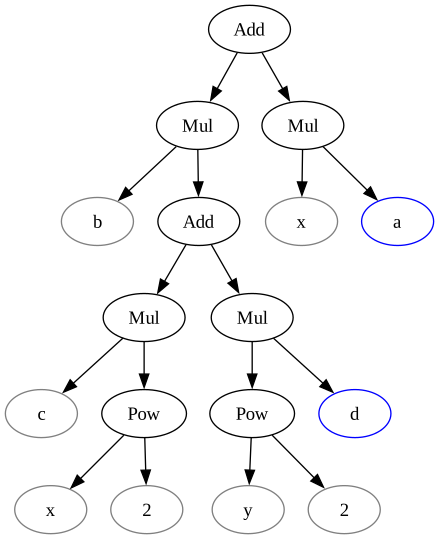
expression = a * x + b * (c * x**2 + d * y**2)
expression
Now, imagine that we have a data distribution over \(x\) and that we only want to optimize the free parameters \(a\) and \(d\).
free_symbols = {a, d}
Normally, we would just use create_parametrized_function() over the entire expression without thinking about which Symbols other than variables \(x\) and \(y\) are to be optimizable parameters:
from tensorwaves.function.sympy import create_parametrized_function

parameter_defaults = {a: -2.5, b: 1, c: 0.0, d: 3.7}
original_func = create_parametrized_function(
    expression,
    parameter_defaults,
    backend="numpy",
)
Note, however, that resulting ParametrizedFunction will have to compute the entire expression tree on each iteration, even though we only want to optimize the blue parameters:
Extract constant sub-expressions#
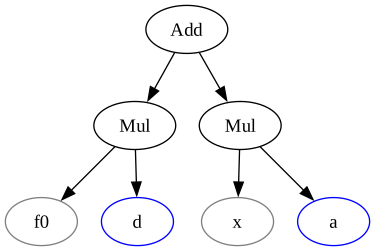
The function extract_constant_sub_expressions() helps us to extract sub-expressions that remain constant with regard to some of its Symbols. It returns a new top-expression where the sub-expressions are substituted by symbols \(f_0, f_1, \dots\), as well as a mapping with sub-expression definitions for these symbols.
from tensorwaves.function.sympy import extract_constant_sub_expressions

top_expression, sub_expressions = extract_constant_sub_expressions(
    expression, free_symbols
)
Now, notice how we have split up the original expression tree into a top tree with parameters that are to be optimized and sub-trees that remain constant:
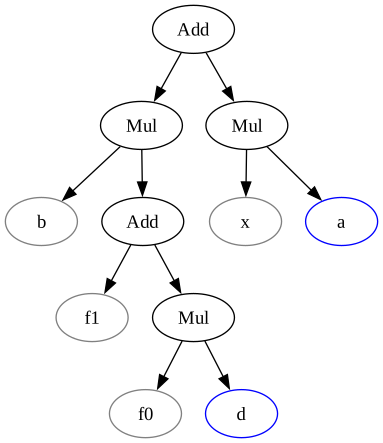
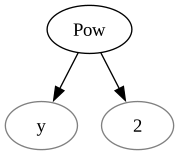
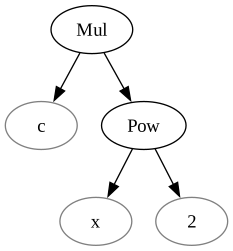
As an additional optimization, we could further substitute the non-optimized parameters with the values to which they are fixed. This can be done with prepare_caching(). Notice how one of the sub-expression trees disappears altogether, because we decided to choose \(c=0\) in the parameter_defaults and how the top tree has been simplified since \(b=1\)!
from tensorwaves.function.sympy import prepare_caching

cache_expression, transformer_expressions = prepare_caching(
    expression, parameter_defaults, free_symbols
)
Caching#
All of the above is mainly useful when optimizing a ParametrizedFunction with regard to some Estimator. For this reason, the estimator module brings this all together with the function create_cached_function(). This function prepares the expression trees just like we see above and creates a ‘cached’ ParametrizedFunction from the top-expression, as well as a DataTransformer to create a ‘cached’ DataSample as input for that cached function.
from tensorwaves.estimator import create_cached_function

cached_func, cache_transformer = create_cached_function(
    expression,
    parameter_defaults,
    free_parameters=free_symbols,
    backend="numpy",
)
Notice that only the free parameters appear as parameters in the ‘cached’ function, how the DataTransformer defines the remaining symbols, and how variables \(x, y\) are the only required arguments to the functions in the DataTransformer:
cached_func.parameters
{'a': -2.5, 'd': 3.7}
cache_transformer.functions
{'f0': PositionalArgumentFunction(function=<function _lambdifygenerated at 0x7fd6297c5bc0>, argument_order=('x', 'y')),
 'x': PositionalArgumentFunction(function=<function _lambdifygenerated at 0x7fd6297c6160>, argument_order=('x', 'y'))}
Performance check#
How to use this ‘cached’ ParametrizedFunction and DataTransformer? And is the output of that function the same as the normal functions created with create_parametrized_function()? Let’s generate generate a small DataSample for the domain \(x, y\):
from tensorwaves.data import NumpyDomainGenerator, NumpyUniformRNG

boundaries = {
    "x": (-1, +1),
    "y": (-1, +1),
}
domain_generator = NumpyDomainGenerator(boundaries)  # ty:ignore[invalid-argument-type]
rng = NumpyUniformRNG()
domain = domain_generator.generate(10_000, rng)
The domain DataSample can be given directly to the original function:
intensities = original_func(domain)
intensities
array([ 2.44449448,  1.20749772, -0.70134597, ...,  1.38537974,
       -1.26177389, -0.86872796], shape=(10000,))
For the ‘cached’ function, we first need to transform the domain. This is where the caching takes place!
cached_domain = cache_transformer(domain)
intensities_from_cache = cached_func(cached_domain)
intensities_from_cache
array([ 2.44449448,  1.20749772, -0.70134597, ...,  1.38537974,
       -1.26177389, -0.86872796], shape=(10000,))
The results are indeed the same and the cached function is faster as well!
%timeit -n100 original_func(domain)

%timeit -n100 cached_func(cached_domain)
25.8 μs ± 4.03 μs per loop (mean ± std. dev. of 7 runs, 100 loops each)
10.6 μs ± 771 ns per loop (mean ± std. dev. of 7 runs, 100 loops each)